Parivahan Sewa — RC, Driving Licence, eChallan & Application Status
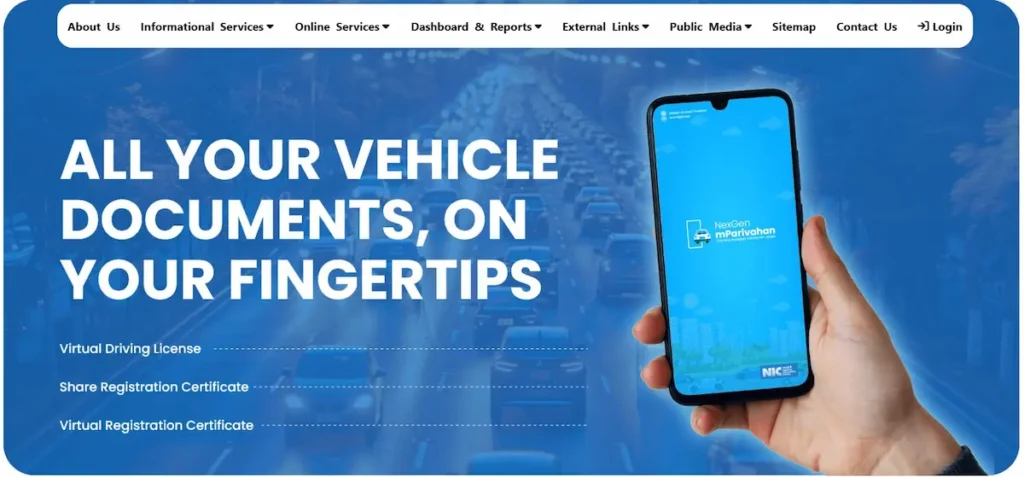
Parivahan Sewa — Quick Access
Ministry of Road Transport & Highways, Govt. of India
Tap any service to continue on the official portal
Parivahan Portal
Check Status
Pay Challan
Driving Licence
RC Download
Vehicle Reg.
Fancy Number
National Permit
What is Parivahan Sewa? (परिवहन सेवा)
Parivahan Sewa is the official online transport portal run by India’s Ministry of Road Transport and Highways (MoRTH). Available at parivahan.gov.in, it connects Regional Transport Offices (RTOs) across all 36 states and union territories into one digital system. Through this portal, Indian citizens can apply for a driving licence, check vehicle registration, pay traffic challans, and access over 40 transport services — without visiting an RTO.
Built by the National Informatics Centre (NIC) under the Digital India initiative, the portal replaced thousands of fragmented state-level RTO systems with a single, unified transport database. Two core platforms handle the bulk of citizen requests. Sarathi (sarathi.parivahan.gov.in) manages all ड्राइविंग लाइसेंस services — from Learner’s Licence applications and driving test bookings to permanent DL renewal and duplicate issuance. VAHAN (vahan.parivahan.gov.in) handles गाड़ी रजिस्ट्रेशन and वाहन पंजीकरण सेवा — RC status checks, ownership transfers, NOC requests, hypothecation entries, and road tax payments.
A third independent platform, eChallan (echallan.parivahan.gov.in), lets vehicle owners check and pay ई-चालान traffic fines issued by police or speed cameras across India. Finally, mParivahan — the official NIC-built mobile app for Android and iOS — stores your digital DL and RC on your phone. Both documents are legally valid under the Motor Vehicles Act, 1988, and are accepted by traffic police in place of physical copies. For any contactless RTO service, these four platforms cover everything a vehicle owner or licence applicant needs.
Which Parivahan Portal Should You Use? (mParivahan vs Sarathi vs VAHAN vs DigiLocker)
The Parivahan ecosystem has five platforms — and choosing the wrong one wastes time. Here is exactly which one to use for each task.
| Platform | Official URL | Use it for | Works on |
|---|---|---|---|
| Parivahan Sewa (Main) | parivahan.gov.in | Navigating to Sarathi, VAHAN, eChallan, mParivahan; RTO info | Web (all devices) |
| Sarathi | sarathi.parivahan.gov.in | Driving Licence: apply, renew, duplicate, status, test booking | Web (all devices) |
| VAHAN | vahan.parivahan.gov.in | Vehicle RC: check, renew, transfer ownership, NOC, tax, fancy number | Web (all devices) |
| eChallan | echallan.parivahan.gov.in | Check pending traffic fines, pay online, download receipt, dispute challan | Web (all devices) |
| mParivahan App | Google Play / App Store Search ‘mParivahan’ — official app by NIC | Store digital DL and RC on phone, check vehicle info, view challan | Android + iOS |
| DigiLocker | digilocker.gov.in | Government-issued digital documents — DL, RC, certificates (legally valid) | Web + App |
How to Check and Pay Your eChallan Online (ई-चालान) — Step-by-Step
To check and pay an eChallan, visit echallan.parivahan.gov.in, enter your Vehicle Number, DL Number, or Challan Number, and follow the steps below.
- Go to echallan.parivahan.gov.in: This is the dedicated eChallan portal. You can also reach it via parivahan.gov.in → Online Services → eChallan.
- Click ‘Check Challan Status’ under ‘Check Online Services’.
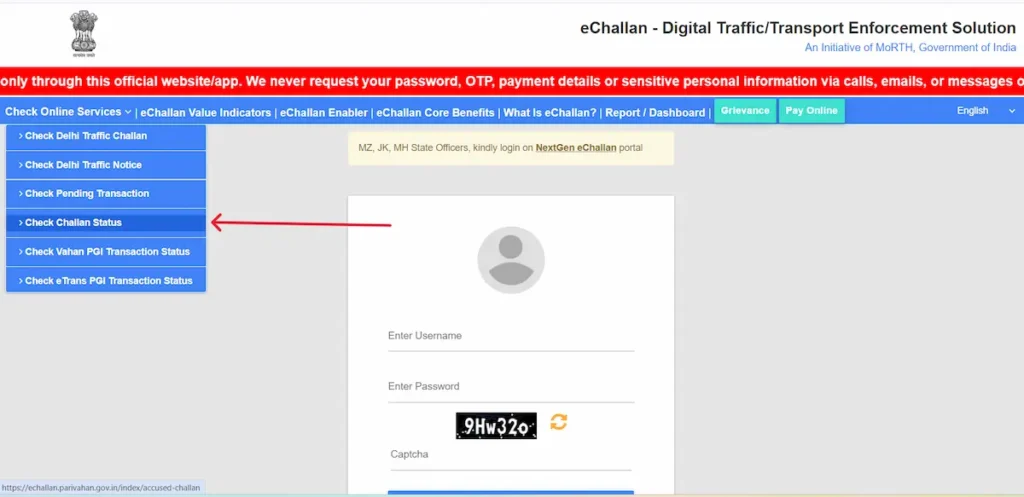
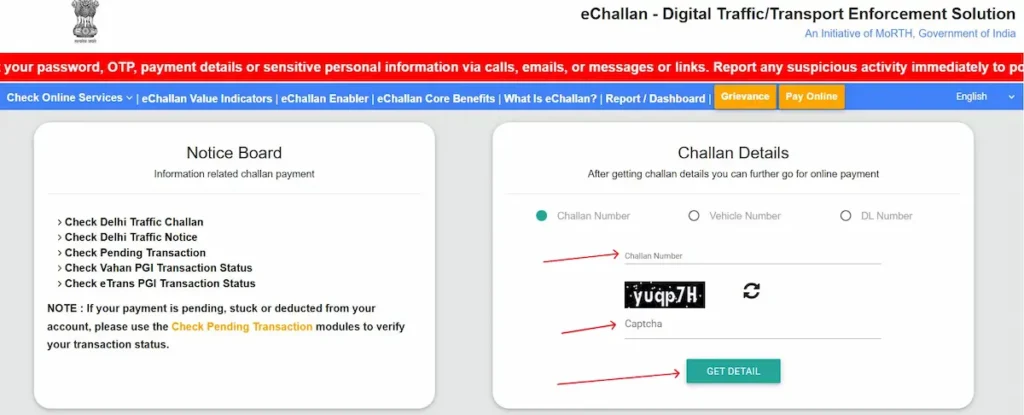
- Enter your details and solve the captcha. Search using any one: Challan Number (from SMS), Vehicle Registration Number, or DL Number. Enter the captcha shown on screen.
- Click ‘Get Detail.’ Your pending or paid challans appear — including violation type, fine amount, date, and issuing authority.
- Click ‘Pay Now’ and complete payment: Choose UPI, Debit/Credit Card, or Net Banking. Download the receipt immediately — this is your legal proof of payment.
What if Your Challan Shows ‘Active’ Even After Payment?
This happens to many users, and it is not a failed transaction. Bank systems and the government eChallan database sync at midnight — a paid challan can show ‘Active’ for up to 48 hours. Click ‘Get Detail’ again after 48 hours to trigger a fresh query of the payment database. If it still shows Active after that, email helpdesk-echallan@gov.in with your transaction ID and a screenshot. Check your bank statement before anything else — do not pay the same challan twice.
How to Dispute a Wrong eChallan
On echallan.parivahan.gov.in, locate your challan and look for the ‘Grievance’ option. Upload your evidence — dashcam footage, a photograph, or a written statement explaining why the challan was incorrectly issued. The dispute goes to the issuing traffic authority; response time varies by state. Do not ignore the challan while waiting. File the dispute and, if it remains unresolved before the deadline, pay first — an unpaid challan can block your vehicle’s renewal.
How to Download Your Vehicle RC Online (गाड़ी रजिस्ट्रेशन / वाहन पंजीकरण) — 3 Methods 2026
You can download your vehicle RC online through three official methods: directly from parivahan.gov.in, through the mParivahan mobile app, or via DigiLocker — all are legally valid. A digital RC stored in the mParivahan app or DigiLocker is legally valid under the Motor Vehicles Act, 1988, as amended by the Motor Vehicles (Amendment) Act, 2019. Traffic police across India are required to accept it. You do not need to carry the physical card.
Method 1 — Check RC Details via parivahan.gov.in (VAHAN)
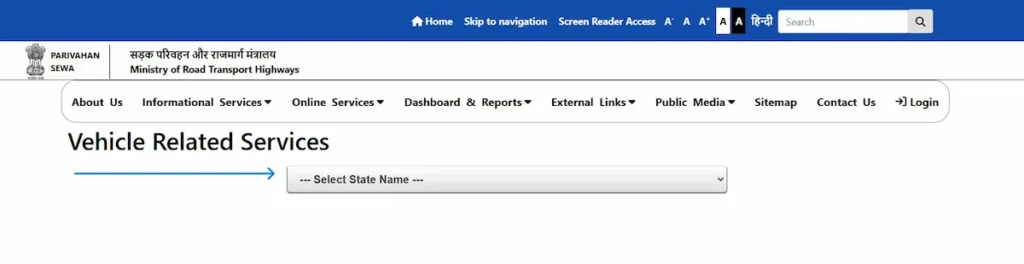
- Go to parivahan.gov.in, click on ‘Online Services’, and then select ‘Vehicle Related Services (VAHAN)’.
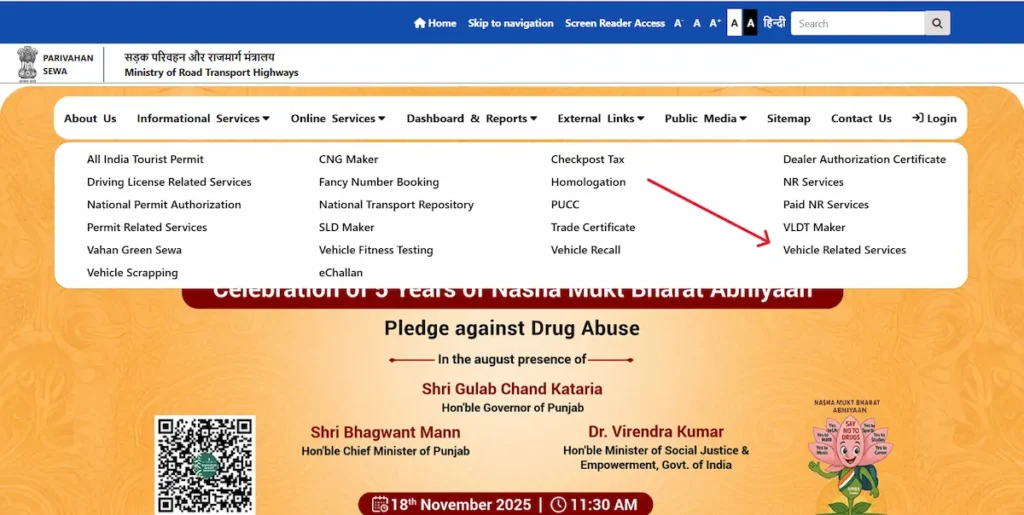
- Select your state — you land on the Vahan Citizen Services page
- Enter your Vehicle Registration Number, Select RTO and click ‘Proceed’ — owner name, insurance validity, fitness expiry, tax, and PUC status appear
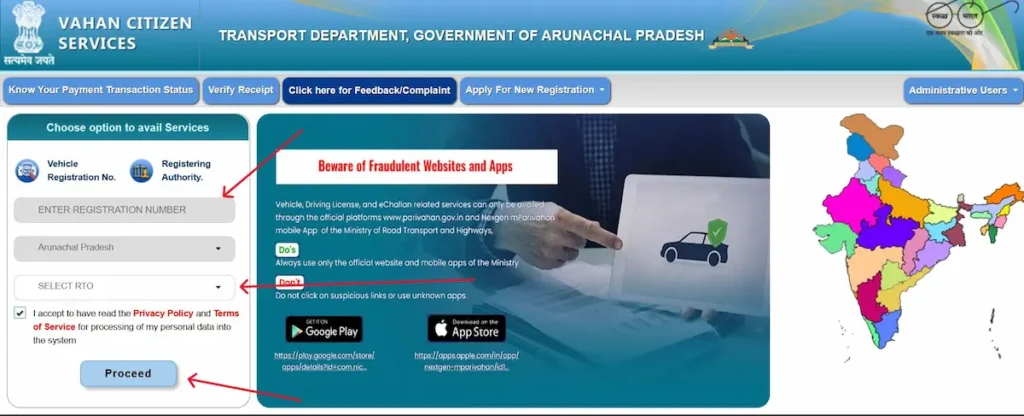
This method shows RC details but does not produce a downloadable PDF. Use Method 2 or 3 for a file you can save or share.
Method 2 — Digital RC via mParivahan App (Recommended)
- Install App: Download the mParivahan app from Google Play or the App Store — install the app by NIC only, not look-alike apps.
- Registration: Open the app, tap ‘Sign In / Sign Up’, enter your mobile number, and verify with OTP.
- Add Vehicle: Tap ‘Add Vehicle’ and enter your registration number.
- Ready to Use: Your Virtual RC loads and is ready to show traffic police directly from your screen.
Method 3 — RC via DigiLocker
- Access & Sign In: Open digilocker.gov.in or the DigiLocker app and sign in using your Aadhaar or registered mobile number.
- Search & Link: Search for Vehicle Registration Certificate and enter your registration number to pull your RC data from the VAHAN database.
- Download PDF: Save the document as a PDF, which is legally accepted by banks, insurance companies, and state departments.
My RC Shows ‘Record Not Found’ — What To Do
If your vehicle was registered recently, the RTO database may not have synced yet — wait 48–72 hours and try again. Check your registration number format: try with and without spaces, and confirm the state code prefix is correct (e.g., UP32AK1234). If the issue continues beyond a week, email helpdesk-vahan@gov.in or visit your registering RTO with the original sale certificate.
How to Apply for a Driving Licence Online via Sarathi Parivahan (ड्राइविंग लाइसेंस)
Getting a driving licence in India is a two-stage process — first the Learner’s Licence (LL), then the Permanent Driving Licence (DL) — both managed through the Sarathi portal at sarathi.parivahan.gov.in.
Everything from ड्राइविंग लाइसेंस application to test booking and final dispatch happens on Sarathi. No RTO visit is needed for the LL stage in most states.
Eligibility — Am I Ready to Apply?
| Licence Type | Minimum Age |
|---|---|
| Gearless two-wheeler (up to 50cc) | 16 years (parent / guardian consent required) |
| Geared motorcycle or car (LMV) | 18 years |
| Commercial / transport vehicle | 20 years |
Documents You Need (Keep These Ready Before You Start)
- Proof of Age (any one): Birth Certificate, Class 10 mark sheet, Passport, PAN Card
- Proof of Address (any one — not older than 3 months): Aadhaar, Passport, Voter ID, utility bill, rental agreement
- Proof of Identity (any one): Aadhaar, PAN Card, Voter ID, Passport
- Photographs: 2–3 recent passport-size photos (count varies by state)
- Form 1: Self-declaration of physical fitness — download from parivahan.gov.in (all applicants)
- Form 1A: Medical certificate from a registered doctor — required for commercial licence applicants and applicants over 40
Step-by-Step — Learner’s Licence (LL) Application
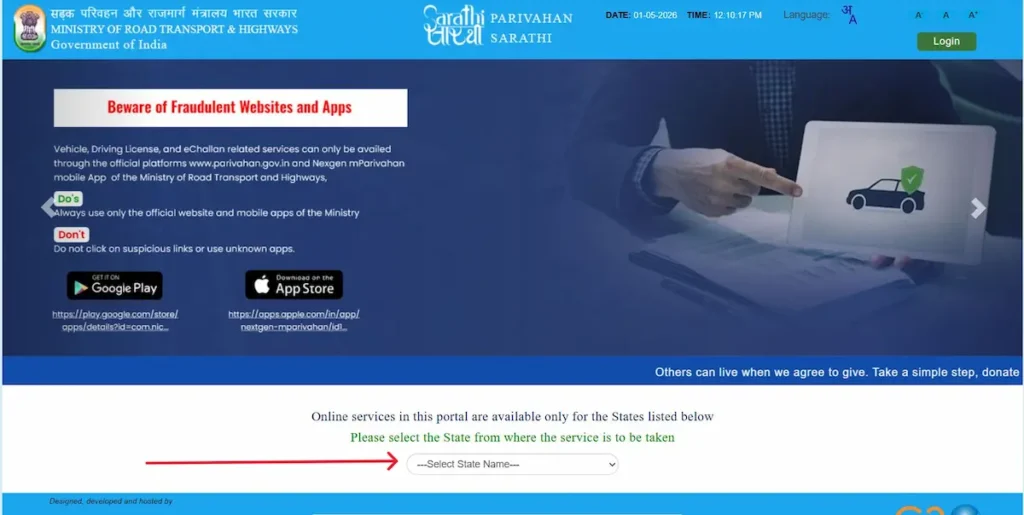
- 1. Open sarathi.parivahan.gov.in and select your state. Use the state dropdown on the homepage. The wrong state routes your application to the wrong RTO.
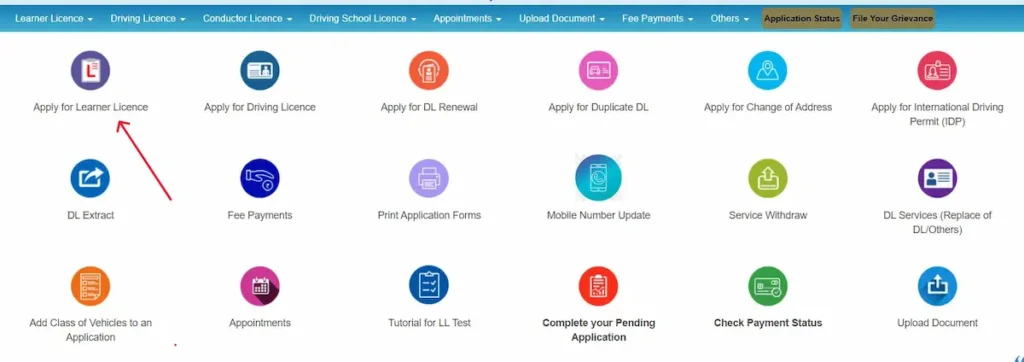
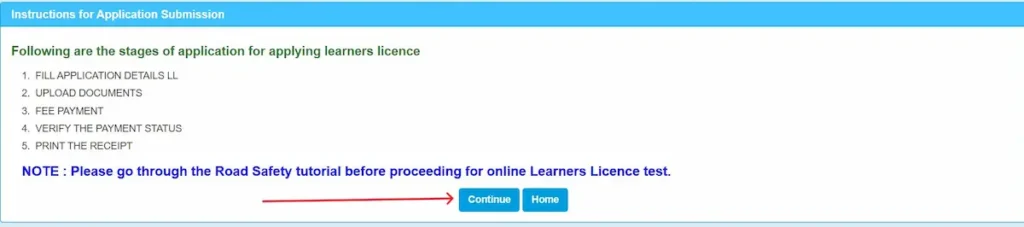
- 2. Click ‘Learner’s Licence’—read the Instructions page — then click ‘Continue’ The portal shows 5 stages before you begin: Fill Application Details — Upload Documents — Fee Payment — Verify Payment Status — Print Receipt. Click Continue to proceed.
- 3. Select your applicant category and click ‘Submit.’ Choose one of three options: Applicant does not hold any DL/LL (first-timers) | Applicant holds a driving license | Applicant holds Learner’s Licence. Select the correct one and click Submit.

- 4. Enter your Mobile Number and Captcha — then click ‘Generate OTP.’ The portal verifies your mobile before allowing you to fill the application. Enter the OTP received on your phone to continue.

- 5. Fill your application details (Form 2) Enter your personal details, address, and vehicle class — LMV for car, MC for motorcycle. Your name must match your Aadhaar exactly.
- 6. Upload your documents: JPG for photos, PDF for documents. File size must be between 10KB and 200KB. No spaces in file names — ‘aadhaar.pdf’ not ‘My Aadhaar.pdf’.
- 7. Pay ₹200 application fee + ₹50 test fee — then verify payment status. UPI, Debit/Credit Card, or Net Banking accepted. After payment, use the Verify Payment Status option on the portal before moving to the next step. Save your receipt.
- 8. Print your receipt — then book and appear for your LL test Save or print the receipt from the portal. Many states offer an online AI-proctored LL test from home — some still require an RTO visit. Check your state’s requirement on the portal before booking. Pass mark: 57% — 12 out of 21 questions in most states.
Step-by-Step — Permanent Driving Licence (DL) Application
You can apply for a DL only after holding the LL for a minimum of 30 days and a maximum of 180 days.
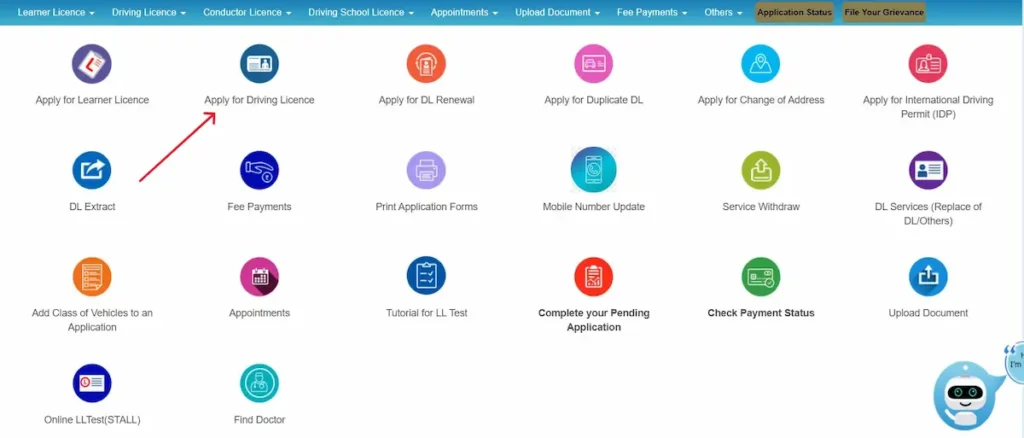
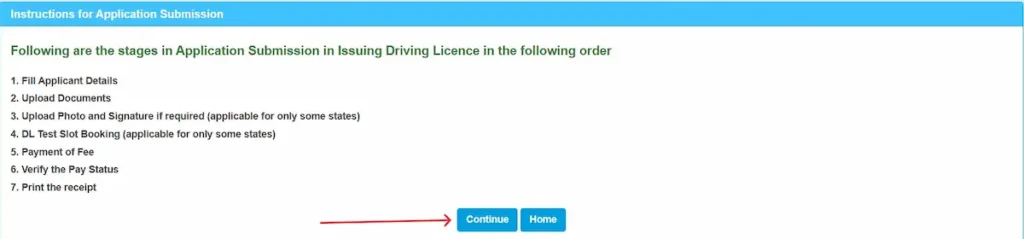
- 1. Go to sarathi.parivahan.gov.in, select your state and click ‘Apply for Driving Licence.’ The portal shows the 7 application stages — read them and click Continue.
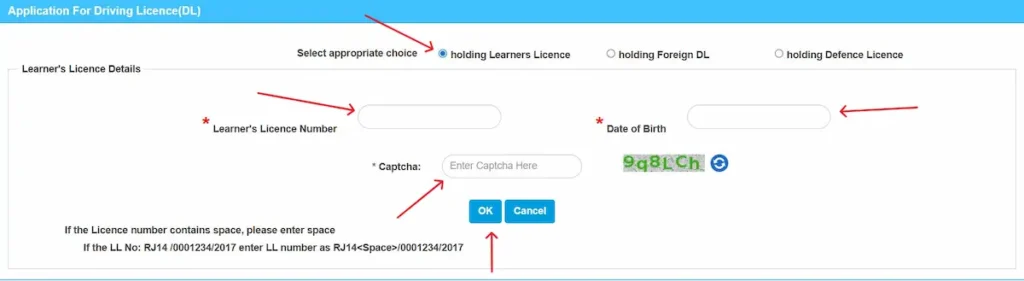
- Select ‘Holding Learners License,’ then enter your LL Number, Date of Birth, and Captcha, and click on ‘OK.’ The system will fetch your LL details. If your LL number contains a space, enter it exactly as shown on your LL—the portal shows an example format on screen.
- 3. Fill your applicant details and upload documents. Upload passport photo, signature, and Form 1A if you are over 40 or applying for a commercial licence. Photo and signature upload applies to some states only — the portal will prompt you if required.
- 4. Book your DL test slot at the RTO (applicable for some states) Select the nearest RTO and a date that works for you. Bring your original LL, payment receipt, and the vehicle you will test.
- 5. Pay ₹200 application fee + ₹300 test fee → verify payment status Pay online via UPI, card, or net banking. Use Verify the Pay Status on the portal before proceeding. Print the receipt.
- 6. Appear for the practical driving test A Motor Vehicle Inspector (MVI) assesses you on a designated track — H-shape or T-shape for four-wheelers, figure-8 for two-wheelers. If you do not pass, re-apply after 7 days.
- 7. Receive your DL at your registered address Dispatched via India Post within 7–14 working days after passing. Track via Application Status on the Sarathi portal.
Driving Licence Fee Structure — All Services (Updated 2026)
Standard driving licence fees in India (set by MoRTH) range from ₹200 to ₹1,000 depending on the service — individual states may charge an additional service fee.
| Service | Fee (₹) |
|---|---|
| Learner’s Licence (LL) | ₹200 |
| LL Test Fee | ₹50 |
| Permanent Driving Licence (DL) | ₹200 |
| Driving Test Fee | ₹300 |
| DL Renewal | ₹200 |
| Late Renewal (after 30-day grace period) | ₹300 + applicable fees |
| Duplicate Driving Licence | ₹250 |
| Adding a new vehicle class to DL | ₹500 |
| International Driving Permit (IDP) | ₹1,000 |
| Driving Licence Test (repeat after fail) | ₹300 per attempt |
These are central government rates under the Motor Vehicles Rules. Some states add a Smart Card fee or service charge. Always confirm the total on the Sarathi payment screen before paying — the portal shows the final amount including any state addition.
How to Check Your Parivahan Application Status — And What Every Status Message Means
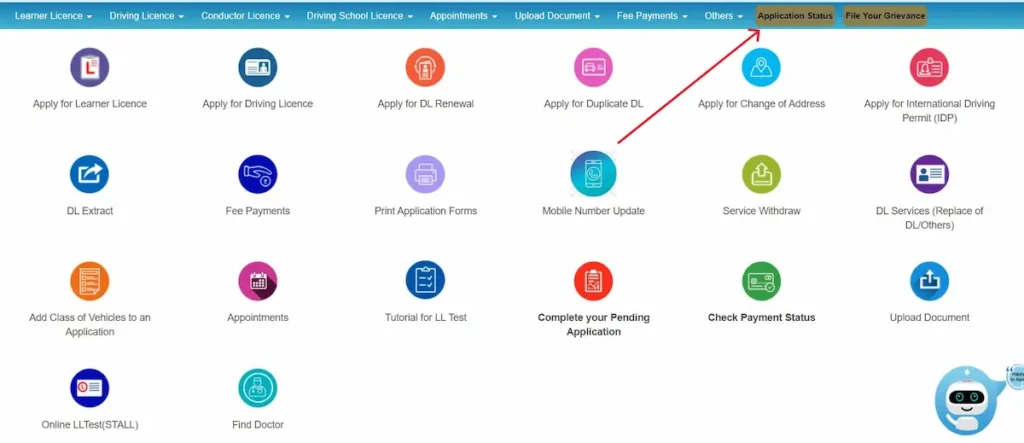
- To check your DL application status: go to sarathi.parivahan.gov.in
- select your state
- click ‘Application Status’
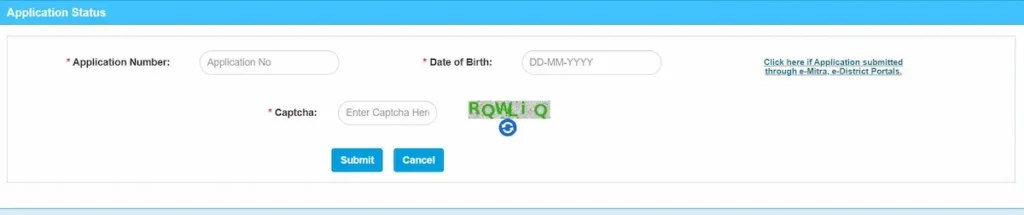
- enter your Application Number + Date of Birth + Captcha
- Click Submit.
What Each Status Message Actually Means
| Status on Portal | What it means | What to do |
|---|---|---|
| Under Process | Your documents are being verified by the RTO. Normal — can take 3–15 working days. | Wait. If it stays here beyond 20 working days, email helpdesk-sarathi@gov.in with your Application Number. |
| Approved | Your DL has been approved and sent for printing. | No action needed. Wait for ‘Dispatched’ status — usually within 2–5 working days. |
| Printed | Your DL card has been printed and is in the dispatch queue. | Dispatch usually follows within 1–3 days of printing. |
| Dispatched | Your DL is with India Post. A tracking ID may appear on screen. | Track your parcel at indiapost.gov.in using the tracking ID shown. |
| Delivered | India Post has marked the parcel as delivered. | Not received? Visit your local post office with the tracking ID — it may be held at the branch. |
| Rejected / Returned with Defects | A document was missing, unclear, or mismatched. Application not processed. | Log back in, read the rejection reason carefully, correct the issue, and re-submit. Fees may apply again. |
Driving Licence Renewal and Duplicate DL — Complete Online Process
How to Renew Your Driving Licence Online
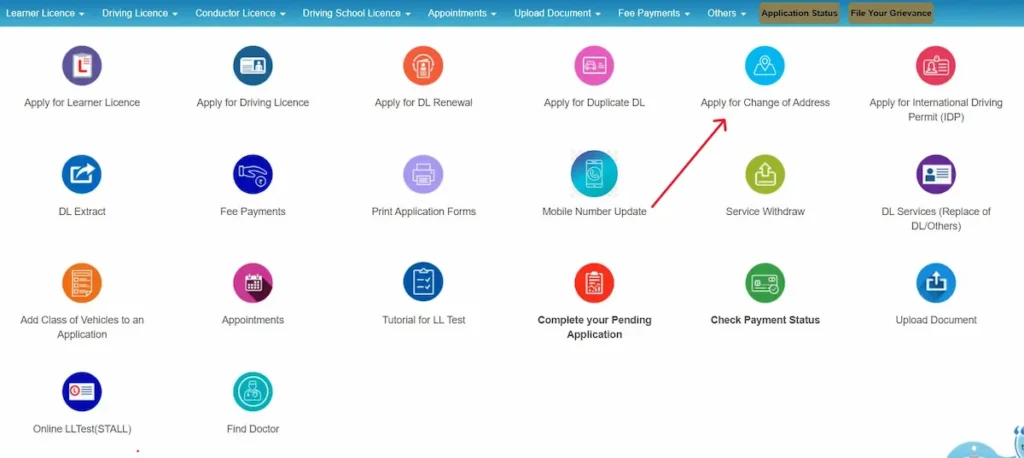
- Go to sarathi.parivahan.gov.in and select your state. If you have moved since your original licence, select your new state and Click ‘Apply for Change of Address’ option too.
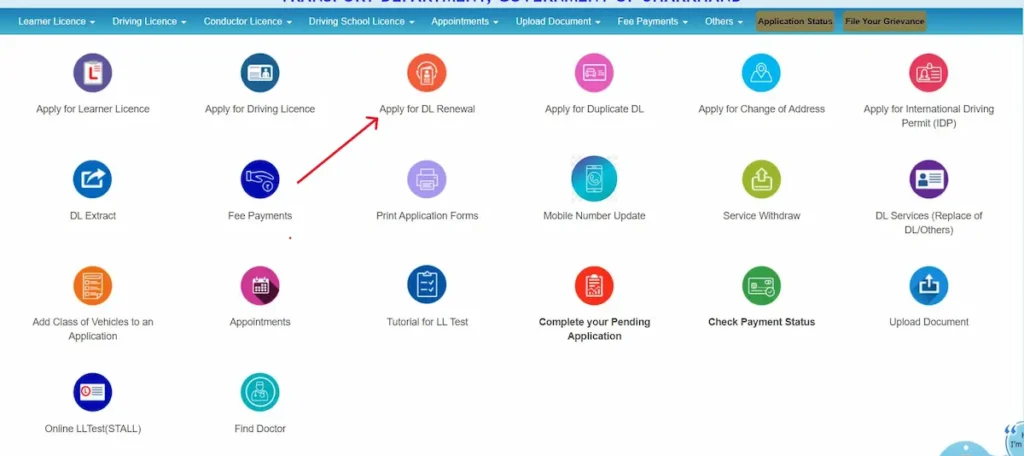
- Click on ‘Services on Drivers License (Renewal/Duplicate/AEDL/Others),’ and then select ‘Apply for DL Renewal.’ Enter your DL number and Date of Birth, then click on ‘Get DL Details’. Verify all loaded details carefully.
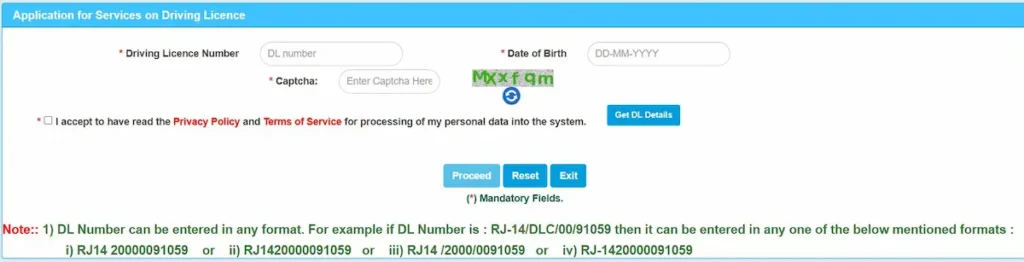
- Upload documents and pay ₹200 Upload: current DL scan, Form 1 (self-declaration), Form 1A (if over 40 or commercial licence), address proof. Pay online.
- Visit RTO if biometric capture is required. Book a slot on the portal. Bring originals. Renewed DL dispatched to your address within 7–14 working days.
How to Apply for a Duplicate Driving Licence
You need a duplicate DL when the original is lost or stolen | it is damaged or unreadable | you need to update your photograph.
- File an FIR first (if DL is lost or stolen) Visit your local police station. File the FIR with specific mention of Driving Licence loss. Keep the FIR copy for upload.
- Go to sarathi.parivahan.gov.in → select state → ‘Apply for Duplicate DL’. The instructions page will open; read them and click “Continue.” Enter DL number, date of birth, and captcha and click ‘Proceed.’
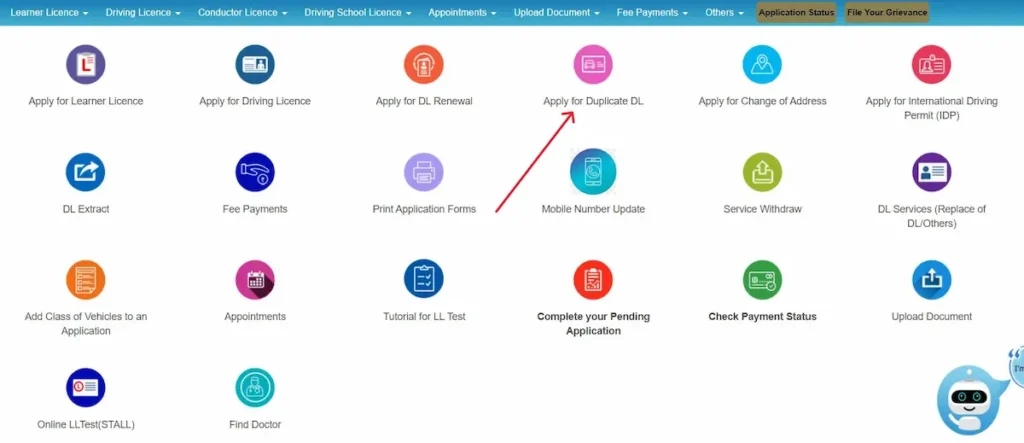
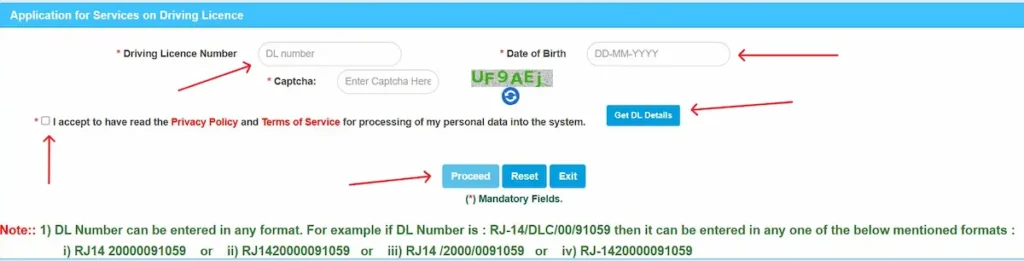
- Select issue reason and fill your details Choose ‘Issue of Duplicate DL’ (lost/stolen) or ‘Replacement of DL’ (damaged). Enter mobile, email, address, and PIN code.
- Upload documents, pay ₹250, book slot if required. Upload: FIR copy (if lost), damaged DL or photos, address proof, passport photo. Duplicate DL arrives by post.
Vehicle Registration, RC, and Ownership Services via VAHAN (वाहन पंजीकरण सेवा)
The VAHAN portal handles everything related to गाड़ी रजिस्ट्रेशन and आरटीओ vehicle records. Here is every service available — with what each one is actually for:
- New vehicle registration — for newly purchased vehicles. Usually handled by the dealer; use the portal to verify the registration was filed correctly.
- RC renewal — for private vehicles older than 15 years. Apply online, pay the fee, attend fitness inspection if required by your state.
- Transfer of vehicle ownership — when buying or selling a used vehicle. Seller submits Form 29; buyer submits Form 30 within 14 days of purchase. Both can be initiated online — final submission may need an RTO visit.
- Duplicate RC — if your Registration Certificate is lost or damaged. FIR required for a lost RC. Apply via VAHAN, pay ₹250–300, receive duplicate by post.
- Hypothecation termination (Form 35) — to remove the bank’s name from your RC after clearing a vehicle loan. Apply online, get NOC from your bank, submit Form 35.
- NOC for inter-state transfer (Form 28) — required when moving a vehicle to another state. Apply online; physical form submission may be needed at the RTO depending on your state.
- Fancy number booking — reserve a preferred registration number before your vehicle is registered. Auction-based; price varies by number and state.
- RC address change — update your address on the Registration Certificate if you have moved.
How to Check Vehicle Owner Details by Registration Number
- Go to parivahan.gov.in → Online Services → Vehicle Related Services (VAHAN)
- Select your state → reach the Vahan Citizen Services page
- Click ‘Know Your Vehicle Details’ or enter the registration number in the vehicle search field
- Details shown: owner name (partially masked), registration date, make/model, insurance validity, fitness expiry, PUC and tax status — no login required for basic details
Parivahan Sewa by State — UP, MP, Bihar, Punjab, Assam & All States
Parivahan Sewa runs on the same central platform across all states — but RTO codes, appointment systems, fee structures, and specific service availability vary by state. Use the state links below to jump directly to your state’s section on the official portal.
Parivahan Sewa UP — Uttar Pradesh (उत्तर प्रदेश)
Prefix: UP + 2-digit district code
UP has the highest number of RTO offices in India. All DL and RC services work through the central Sarathi and VAHAN portals — select Uttar Pradesh from the state dropdown. Common codes: UP32 (Lucknow), UP80 (Noida), UP14 (Agra). For state transport queries, visit uptransport.upsdc.gov.in.
Parivahan Sewa MP — Madhya Pradesh
Prefix: MP + district code
Key codes: MP04 (Bhopal), MP09 (Indore). All DL and वाहन पंजीकरण सेवा functions are available through central Sarathi and VAHAN — select Madhya Pradesh from the dropdown. State transport department: transport.mp.gov.in.
Parivahan Sewa Bihar
Prefix: BR + district code
Key RTOs: BR01 (Patna), BR06 (Gaya). All services via parivahan.gov.in — select Bihar from the dropdown. बिहार के निवासी sarathi.parivahan.gov.in पर जाकर ‘Bihar’ राज्य चुनें। Mobile usage is high in Bihar — the mParivahan app works well for digital DL and RC access.
Parivahan Sewa Punjab
Prefix: PB + district code
Key RTOs: PB02 (Ludhiana), PB10 (Amritsar). All DL and RC services through the central portal — select Punjab from the state dropdown. State transport reference: punjab.gov.in (transport section).
Parivahan Sewa Assam
Prefix: AS + district code
Key RTOs: AS01 (Guwahati), AS15 (Dibrugarh). The central parivahan.gov.in portal works for Assam — select Assam from the dropdown. Rural users in parts of Assam may face internet connectivity limitations — for remote areas, an in-person RTO visit remains the most reliable option for services requiring biometric capture.
Common Parivahan Portal Problems — Verified Fixes
Problem 1 — Payment Deducted But Application Still Shows ‘Pending’
- The payment gateway and state treasury database do not sync in real time — wait 48 hours. Do not pay again or submit a second application.
- After 48 hours, open your application dashboard and use ‘Verify Payment Status’ — this triggers a manual re-query of the transaction.
- Still unresolved after 72 hours? Email helpdesk-sarathi@gov.in (DL) or helpdesk-vahan@gov.in (vehicle) with your Transaction ID, Application Number, and a bank statement screenshot.
Problem 2 — Document Upload Fails (‘File Not Supported’ or ‘Server Error’)
- Accepted formats only: JPG/JPEG for photos, PDF for documents — no PNG, no Word files, no HEIC.
- File size must be between 10KB and 200KB — files outside this range are silently rejected with no clear error.
- File name must have no spaces — rename
My Aadhaar.pdftomyaadhaar.pdfbefore uploading. - If the portal keeps timing out, switch to Firefox or Chrome on a desktop — mobile browser uploads fail more often.
Problem 3 — Aadhaar e-KYC Error / ‘Name Mismatch’
- The portal does a character-level match — ‘Rahul S. Sharma’ fails if Aadhaar shows ‘Rahul Sharma’.
- Fix 1: Update your Aadhaar name at uidai.gov.in or the nearest Aadhaar enrolment centre first, then re-apply.
- Fix 2: If updating Aadhaar is not possible right now, select the ‘Non-Aadhaar’ (physical verification) flow on the portal — this needs an RTO visit but bypasses the mismatch block.
Problem 4 — No Test Slots Available
- Slots are released at 10 AM daily — log in at exactly 10:00 AM and refresh immediately.
- If your preferred RTO is fully booked, select any nearby RTO in the same state — you can appear at any RTO, not just your home one.
- Use Firefox on a desktop — the calendar slot picker is known to break on Chrome mobile.
- Monday slots book out fastest — try selecting Wednesday or Thursday for better availability.
Problem 5 — mParivahan App Shows Blank RC or Login Loop
- Clear app data by going to Settings, then Apps, then mParivahan, then Storage. Tap on ‘Clear Cache’ and then ‘Clear Data’, then log in again.
- If Virtual RC shows blank, delete it from the app and re-add your vehicle — this forces a fresh fetch from the VAHAN database.
- Login Loop (app keeps returning to login screen): update to the latest version from Play Store or App Store first.
- Disconnect any active VPN — the mParivahan app blocks VPN connections to prevent data spoofing.
Problem 6 — DL Dispatched But Not Received (India Post)
- Track at indiapost.gov.in using the consignment number shown in your Application Status on Sarathi.
- Tracking shows ‘Delivered’ but nothing arrived? Visit your local post office with the consignment number — cards are sometimes held at the branch after a failed delivery attempt.
- No tracking ID visible, or tracking unavailable? Wait 21 days from dispatch date, then email helpdesk-sarathi@gov.in.
- Do not apply for a Duplicate DL until 30 days have passed from dispatch — it may still be in transit.
Important RTO Forms — Driving Licence and Vehicle Services
Driving Licence Forms
| Form | Name / Purpose | When to use it |
|---|---|---|
| Form 1 | Self-declaration of fitness | Required for ALL non-commercial DL applications. Fill and submit online. |
| Form 1A | Medical Certificate | Required if you are over 40 OR applying for a commercial / transport vehicle licence. |
| Form 2 | LL / DL application | Base application form — used for new LL, new DL, renewal, duplicate, and adding a vehicle class. |
| Form 3 | Learner’s Licence certificate | Issued after passing the LL test — this IS your LL. Print it from the Sarathi portal. |
| Form 4A | Permanent DL application | For applying for the permanent DL after holding the LL. Filled online on Sarathi. |
| Form 8 | Add new vehicle class to DL | Use to add a car licence to an existing bike licence, or add HMV to an LMV licence. |
| Form 9 | DL renewal application | Specifically for renewing an existing DL. Some states use Form 2 — check your Sarathi portal. |
Vehicle-Related Forms
| Form | Purpose | When needed |
|---|---|---|
| Form 25 | RC Renewal | Renewing a vehicle’s registration certificate before or after expiry. |
| Form 26 | Duplicate RC | Requesting a replacement RC when the original is lost, stolen, or damaged. |
| Form 28 | NOC for inter-state transfer | Moving a vehicle to another state. Apply online; physical submission may be needed. |
| Form 29 | Ownership transfer notice (seller) | Filed by the seller to notify the RTO of the sale — within 14 days. |
| Form 30 | Ownership transfer (buyer) | Filed by the buyer to complete the transfer of ownership — also within 14 days. |
| Form 35 | Hypothecation termination | Removing the bank’s name from the RC after a vehicle loan is fully repaid. |
Frequently Asked Questions About Parivahan Sewa
What is Parivahan Sewa?
Parivahan Sewa (parivahan.gov.in) is India’s official online transport portal run by MoRTH. It covers driving licence applications, vehicle registration, eChallan payments, and 40+ transport services — connecting all RTOs across India into one digital system.
How do I download my vehicle RC?
Use the mParivahan app (Android or iOS) or DigiLocker for a legally valid digital RC. For detailed registration info, go to parivahan.gov.in → Vehicle Related Services → enter your registration number.
Can I renew my driving licence without visiting the RTO?
In many states, yes — the full renewal can be done online for non-commercial licences. Some states require a physical visit for biometric capture. Check your state’s requirement on the Sarathi portal when you begin the process.
Is a digital DL or RC legally valid in India?
Yes. A digital DL stored in the mParivahan app or DigiLocker is legally valid across India under the Motor Vehicles Act, 1988, as amended in 2019. Traffic police are required to accept it.
Official Parivahan Sewa Helpline & Support Contacts
| Service | Contact | Timings |
|---|---|---|
| Vehicle Registration, RC, Tax, Permit | helpdesk-vahan@gov.in | 6 AM – Midnight |
| Driving Licence (Sarathi) | helpdesk-sarathi@gov.in | 6 AM – Midnight |
| mParivahan App | helpdesk-mparivahan@gov.in | 6 AM – Midnight |
| eChallan Queries | helpdesk-echallan@gov.in | 6 AM – Midnight |
| General Helpline (Phone) | 1800-180-0151 (toll-free) | 6 AM – Midnight |